Conceptual B2C SaaS application (packaged)
This is a conceptual consumer oriented SaaS application focusing on implementing Customer Identity and Access Management (CIAM) using Microsoft Identity Platform (and its common endpoint) and Azure AD B2C.
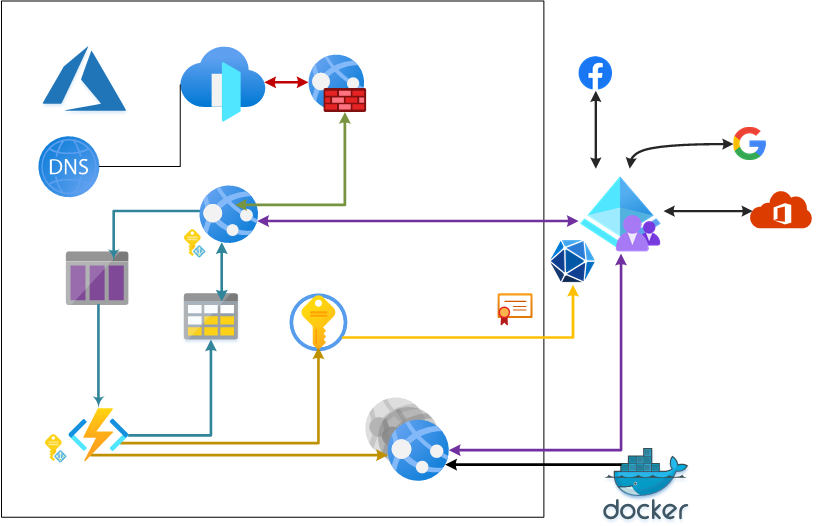
The following simplified architecture diagram illustrates the solution
Authentication
This implementation focuses on proper Customer Identity and Access Management
The CIAM (Customer Identity and Access Management) is based on Azure AD B2C and supplemented with Microsoft Identity Platform's common endpoint.
This implementation uses Google and Facebook as social sign-in platforms and Azure AD as business sign-in platform. Sign-in with Google works equally good with authenticating @google.com consumer accounts, but also GSuite customers.
Business sign-in with Azure AD (Microsoft 365) utilizes the multi-tenant approach (/common endpoint). You can read more about multi tenant applications in Microsoft Identity Platform here. This approach is combined with the Azure AD B2C - Add Azure AD (multi-tenant) Identity Provider. And also implements tenant filtering on the B2C site. Currently the only Microsoft 365 Business tenants allowed to sign-in is limited to very few. If you try to sign-in with not allowed tenant, you will get an error. This is expected and desired behavior to also demonstrate filtering of business tenants at CIAM level.
The authentication process is same for both the "master" application (this one) and each "child" instance.
Authorization
There are no special authorization rules for the master app. Anyone with G+ / Facebook account, or with business account from allowed Microosft 365 Tenants can sign-in and create new instance.
Instance Authorization
Each created instance has 3 sections
- Simple Auth - There are no authorization checks here
- Tenant Auth There is simple authorization check here that matches the value of TonycoTenantId application setting with value provided in user's token. This information is saved on the user object using custom attribute in Azure AD B2C when you create an instance.
- Roles Auth - this authorization extends the instance auth and adds a requirement that the user in the TonycoAdmin Role. This only works for business users from Microsoft 365 business universe. It is implemented using the Application Roles model
Role Based Authorization in each instance
The Roles Auth in each tenant relies on the standard build-in Role-Based Authorization in ASP.NET Core. Roles for users are configured as follows:
- For social users (G+, Facebook) there is no special handling - only single default role (TonycoUser) is emitted.
- For Business Users (Microsoft 365), the Application Roles model is used.
- TonycoMasterAdmin
- TonycoMasterUser
- TonycoAdmin
- TonycoUser
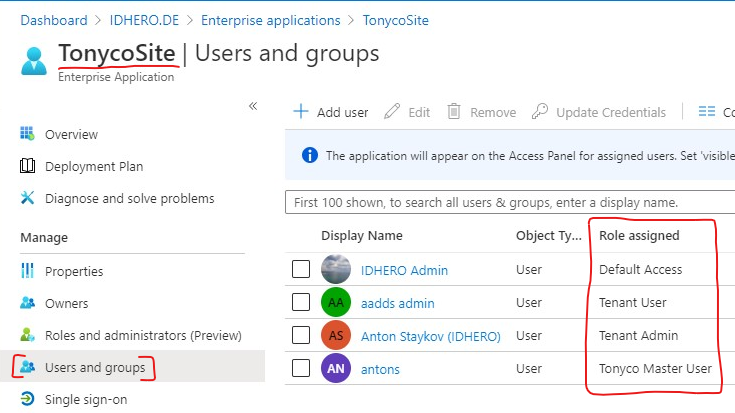
The roles you assign to users will be sent to Azure AD B2C during the sign-in process, and then Azure AD B2C will send those to the applicaiton.
Inviting user to your instance
The invitation process is over-simplified and works as follows:
- You are only allowed to "invite" users to instances you are in (are "yours")
- You are only allowed to "invite" users using same Identity Provider as you. For example if you are signed-in usign Google, you can only invite users who also sign-in using Goole.
- When inviting user you provide their sign-in name with the Identity Provider (this would be the @gmail.com e-mail for Google for example, or respective user's email as registered with Facebook, or the user's user principal name (UPN) if you are signed-in using your business Microsoft 365 account.
- The process is searching for existing user with same identity provider as you and identifier you provided (e-mail address)
- If the user is found, their extension property with the list of allowed tenants is updated with the id of your tenant
-
If the user is not found then:
- A new user object (placeholder) is created indicating Identity Provider and their sign-in name (e-mail that you provided)
- That user's extension property indicating instance is updated
- No mails are sent!
- When a user signs-in, Azrue AD B2C Policy first searches for such placeholder users to do a match. If match is found, user object is properly updated with their original issuer assigned id.
Instance creation process
When authenticated user wants to create a new instance they submit request. This request translates into Azure Storage Queue message. Information about currently signed-in user, requested instance identifier and custom domain (optional) is sent in this queue.
Actual creation
Azure Function is being triggered by the storage queue. Then the user obect in Azure AD B2C is updated with the instance id. This is requried so that the user gets access to their instance later.
Next step in this function is, to create App Registration in Azure AD B2C that is specific to this new instance. It is configured with reply URL for the newly created instance (in the azurewebsites.net domain) and, optionally, the custom domain. Currently only FQDN without port is supported. Reply URL are always and only HTTPS.
Then an Azure ARM deployment starts - instance website is packed in a container image and published into the public Docker Hub repository of astaykov. This image is then deployed to an App Service for Linux Containers plan. All instances are deplyoed in the same app service plan. In this deplyoment the following app settings are baked:
- client_id for the Azure AD B2C app registration - taken from previous step
- signup/sign-in policy for the Azure AD B2C app registration - currently fixed, same for all tenants and the master site
- tenant id - important and always present. This settings makes the match between user and instance
In the last step the list of tenants (Azrue Table Storage) is updated with the important data about the tenant:
- The instance identifier (tenent_id)
- User who created the isntance (object id in Azrue AD B2C)
- Client ID for the App registration in Azure AD B2C
- Custom Domain (if provided)
- The Identity Provider the signed-in user was using when they created the isntance
Best practices or could architecture patterns implemented in this project
-
Use Managed Identities when possible
- Function App uses Managed Identity to deploy "tenant" environment (app service web site).
- Function App uses Managed Identity to connect to Key Vault.
-
Use Service Principal certificate authentication when possible
Function App uses Certificate Auth for Service Principal to configure Azure AD B2C
-
Decouple tiers
- Web Front End is completely decoupled from tenant creation process, which is time consuming
- Web Front End uses Queues to send notification about tenant creation
-
Protect at all layers
- Web App is protected via Azure Front Door Web Application Firewall
- Web App allow only requests originating from Front Door Instance
- Web App allow only HTTPS requests
- Web App allow only TLS 1.2 encryption